Smooth
The smooth() function refines a label map (e.g., output of a clustering algorithm) by applying Gaussian filtering iteratively.
Example
The following example shows smoothing of cluster labels on a synthetically generated DataCube segmentation.
 1import wizard
 2from wizard._utils.example import generate_pattern_stack
 3from wizard._processing.cluster import kmeans, smooth_cluster
 4import matplotlib.pyplot as plt
 5
 6# generate synthetic data with spatial patterns
 7data = generate_pattern_stack(20, 250, 350, n_circles=3, n_rects=3, n_triangles=2)
 8
 9# create a DataCube
10dc = wizard.DataCube(data)
11
12# apply plain KMeans clustering
13labels = kmeans(dc, n_clusters=4, n_init=25)
14
15# apply Gaussian smoothing to the raw label map
16smoothed_labels = smooth_cluster(labels, sigma=.6, n_iter=2)
17
18# visualize a wavelength slice, raw labels, and smoothed labels
19fig, axes = plt.subplots(1, 3, figsize=(15, 5))
20
21axes[0].imshow(dc[5])
22axes[0].set_title("Original Slice (λ index 5)")
23axes[0].axis("off")
24
25axes[1].imshow(labels)
26axes[1].set_title("Raw KMeans Labels")
27axes[1].axis("off")
28
29axes[2].imshow(smoothed_labels)
30axes[2].set_title("Smoothed Labels")
31axes[2].axis("off")
32
33plt.tight_layout()
34plt.show()
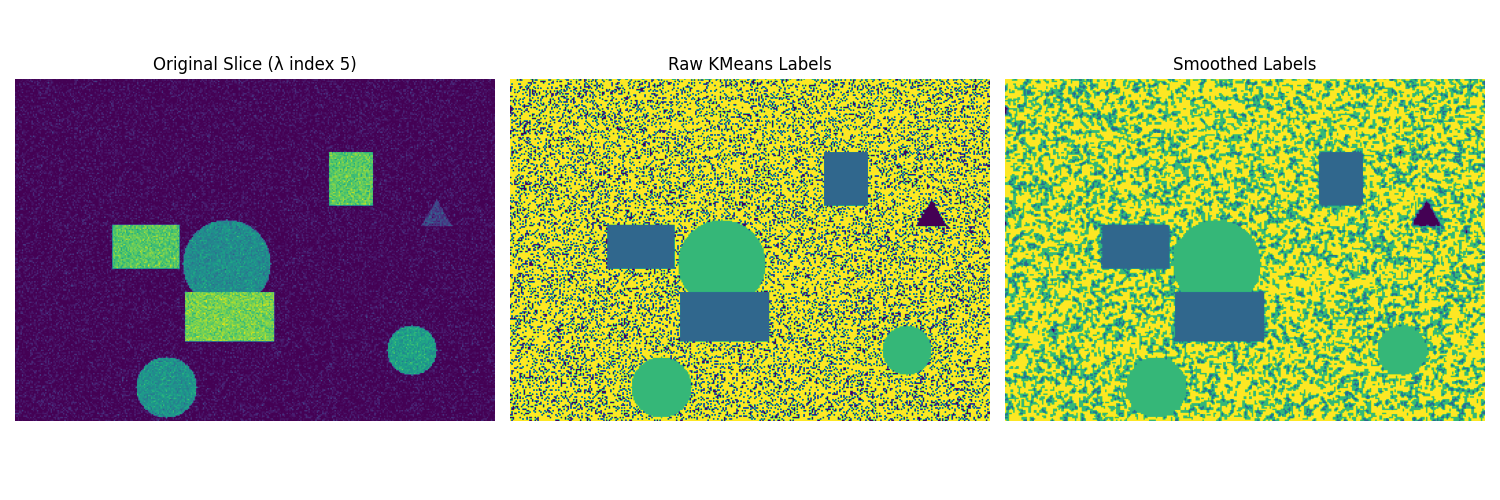
The output demonstrates how Gaussian filtering with multiple iterations produces cleaner, more spatially coherent segment boundaries.