HeiPorSPECTRAL
This example demonstrates the use of the hsi-wizard package to process and visualize biomedical hyperspectral data from the HeiPorSPECTRAL dataset.
The focus is on a spleen tissue scan (sample ID: P086#2021_04_15_09_22_02), part of a collection of annotated hyperspectral scans of human organs. hsi-wizard manages the complete pipeline: reading the raw .dat hyperspectral cube, handling metadata like wavelength calibration, and applying clustering to segment different tissue types based on spectral signatures.
Note
This example uses data from the HeiPorSPECTRAL dataset, published by Studier-Fischer et al. (2023)
Example
The following script demonstrates how to load and analyze a spleen sample from the HeiPorSPECTRAL dataset using hsi-wizard.
  1"""
  2This snippet demonstrates the use of the hsi-wizard package for processing and visualizing
  3hyperspectral data, using a real sample from the HeiPorSPECTRAL dataset [Studier‑Fischer et al., 2023](https://doi.org/10.1038/s41597-023-02315-8).
  4The focus is on the spleen example (P086#2021_04_15_09_22_02).
  5
  6The Dataset is availbe on there [Webseite](https://heiporspectral.org)
  7"""
  8
  9from matplotlib import pyplot as plt
 10from matplotlib.colors import ListedColormap
 11import numpy as np
 12import wizard
 13from wizard._processing.cluster import pca, spatial_agglomerative_clustering, smooth_cluster
 14
 15# Paths
 16data_path = '2021_04_15_09_22_02_SpecCube.dat'
 17rgb_path = '2021_04_15_09_22_02_RGB-Image.png'
 18mask_path = 'HeiPorSPECTRAL_example/data/subjects/P086/2021_04_15_09_22_02/annotations/2021_04_15_09_22_02#polygon#annotator3#spleen#binary.png'
 19
 20# Load and crop RGB image
 21rgb_img = plt.imread(rgb_path)[30:-5, 5:-5]
 22mask = plt.imread(mask_path)
 23
 24# Create transparent blue colormap
 25n = 256
 26alpha_blues = np.zeros((n, 4))
 27alpha_blues[:, 2] = 1  # Blue channel
 28alpha_blues[:, 3] = np.linspace(0, 1, n)  # Transparency
 29t_to_b = ListedColormap(alpha_blues)
 30
 31# Custom reader
 32def read_spectral_cube(path) -> wizard.DataCube:
 33    """
 34    Read a spectral cube from a binary file and return it as a DataCube object.
 35
 36    Parameters
 37    ----------
 38    path : str
 39        Path to the binary file containing the spectral cube.
 40
 41    Returns
 42    -------
 43    DataCube
 44        A wizard.DataCube object
 45
 46    Credits
 47    -------
 48    Inspired by code from: https://github.com/IMSY-DKFZ/htc
 49    """
 50    shape = np.fromfile(path, dtype=">i", count=3)
 51    cube = np.fromfile(path, dtype=">f", offset=12).reshape(*shape)
 52    cube = np.swapaxes(np.flip(cube, axis=1), 0, 1).astype(np.float32)
 53    wavelengths = np.linspace(500, 1000, cube.shape[2], dtype='int')
 54    return wizard.DataCube(cube.transpose(2, 0, 1), wavelengths=wavelengths, notation='nm', name='HeiProSpectral')
 55
 56# Read data
 57dc = wizard.DataCube()
 58dc.set_custom_reader(read_spectral_cube)
 59dc.custom_read(data_path)
 60
 61# Inspect Data
 62wizard.plotter(dc)
 63
 64# Clustering
 65dc_pca = pca(dc, n_components=10)
 66agglo = spatial_agglomerative_clustering(dc_pca, n_clusters=5)
 67agglo = smooth_cluster(agglo, n_iter=10, sigma=0.5)
 68
 69# Highlight a specific cluster (e.g., label 2)
 70highlight = (agglo == 2).astype(float)
 71
 72# Plot results
 73fig, axes = plt.subplots(2, 2, figsize=(14, 10))  # 2x2 layout
 74
 75# Flatten axes array for easier indexing
 76axes = axes.flatten()
 77
 78# Update font size for titles
 79title_fontsize = 14
 80
 81# Top-left: Original RGB Image
 82axes[0].imshow(rgb_img)
 83axes[0].axis('off')
 84axes[0].set_title('Original RGB Image', fontsize=title_fontsize)
 85
 86# Bottom-left: RGB with Manual Annotation
 87axes[1].imshow(rgb_img)
 88axes[1].imshow(mask, cmap=t_to_b, alpha=0.6)
 89axes[1].axis('off')
 90axes[1].set_title('RGB with Manual Annotation', fontsize=title_fontsize)
 91
 92# Top-right: RGB with Cluster Overlay
 93axes[3].imshow(rgb_img)
 94axes[3].imshow(highlight, cmap=t_to_b, alpha=0.6)
 95axes[3].axis('off')
 96axes[3].set_title('RGB with Cluster Overlay', fontsize=title_fontsize)
 97
 98# Bottom-right: Cluster Map
 99axes[2].imshow(agglo, cmap='cool')
100axes[2].axis('off')
101axes[2].set_title('Spatial Agglomerative Clustering\non PCA-Reduced Spectral Data (k=5)', fontsize=title_fontsize)
102
103plt.tight_layout()
104plt.show()
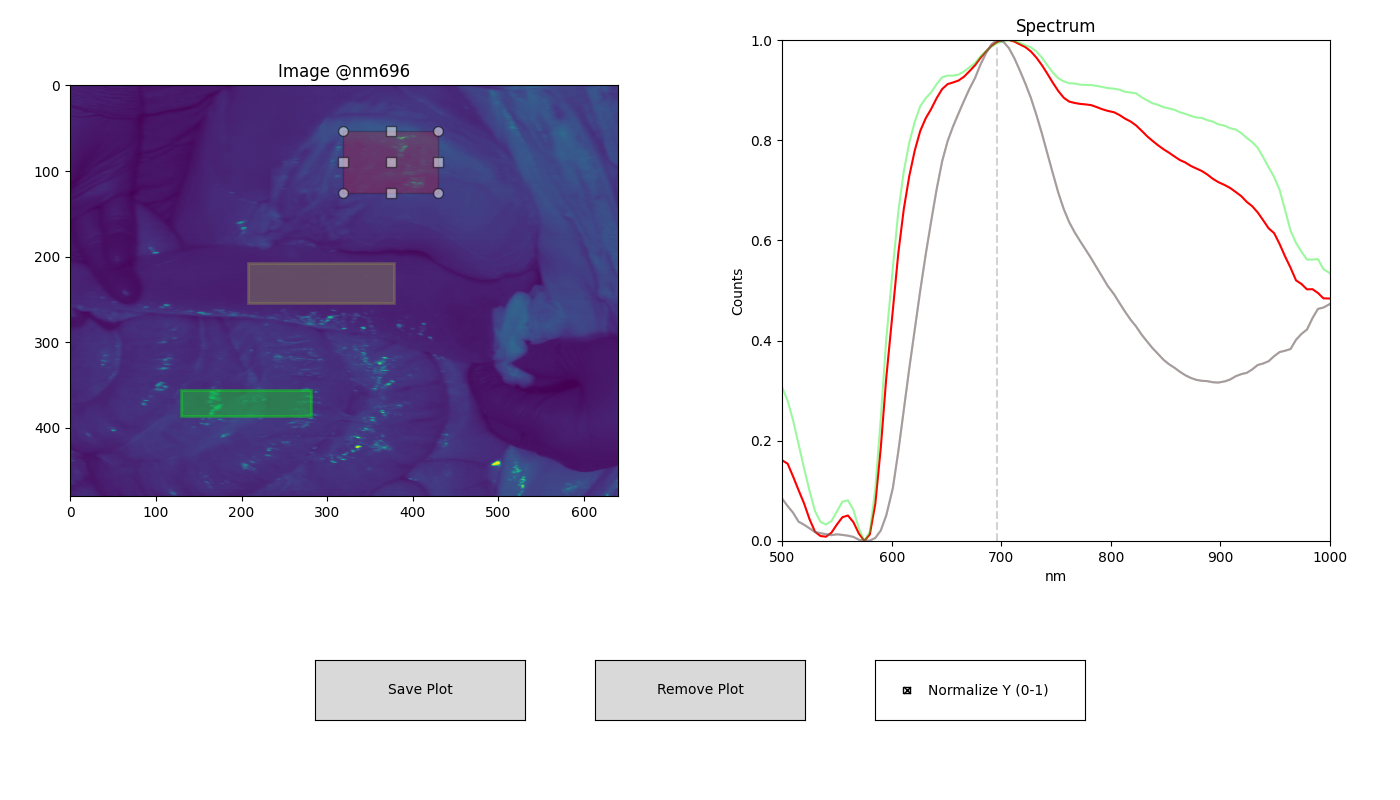
ROI-based spectral analysis using the interactive plotting interface of hsi-wizard. The left panel displays selected tissue regions at 696 nm, while the right panel shows the corresponding normalized spectral profiles.
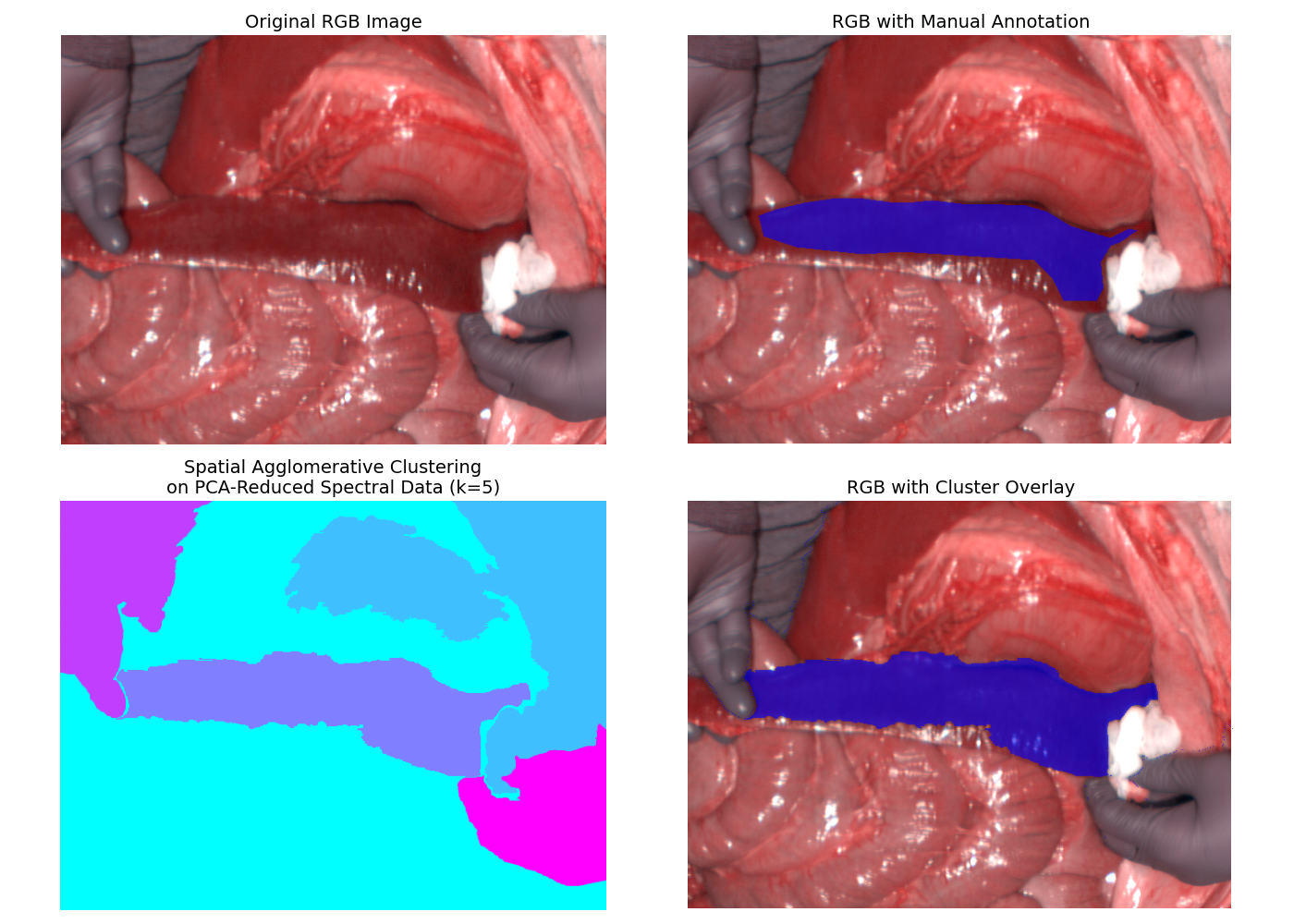
Comparison of manual annotation (top-right) from Studier-Fischer et al. (2023) with automated segmentation (bottom-left) using spatial agglomerative clustering (k = 5). The RGB image (top-left) and the cluster map (bottom-right) offer context and visual feedback for the clustering result.